The controller of the data within the scope provided above is Ailleron S.A. with headquarters in Krakow, Jana Pawła II Ave. 43b, postal code 31-864, KRS no. 0000385276. The data will be processed in order to provide information about products and services of Ailleron S.A. and other entities from Ailleron Group. The data will be processed for a period of 3 years. You have the right to access the data, to receive copies, to rectify, delete or demand to limit their processing, to object to processing and to withdraw your consent for marketing contact – by sending us an e-mail: dane.osobowe@ailleron.com. For full information about processing of personal data please visit Privacy Policy.
What's New?
Stay updated with LiveBank's latest features, improvements, and integrations. Discover what's new and enhance your banking experience.
New Administration Enhancements
New FeatureNew Settings
August 2026
We’ve introduced two practical improvements that make day-to-day administration of the LiveBank platform even more efficient. Activating Users Without Deleting Them [Screenshot showing a user being deactivated]Managing user accounts is now more flexible. Administrators can activate or deactivate users directly from the users list, eliminating the need to permanently remove accounts when an employee is temporarily unavailable or changes responsibilities. [Screenshot showing the list of users] The newest improvement allows organizations to preserve user configuration and history while quickly controlling [...]
We’ve introduced two practical improvements that make day-to-day administration of the LiveBank platform even more efficient.
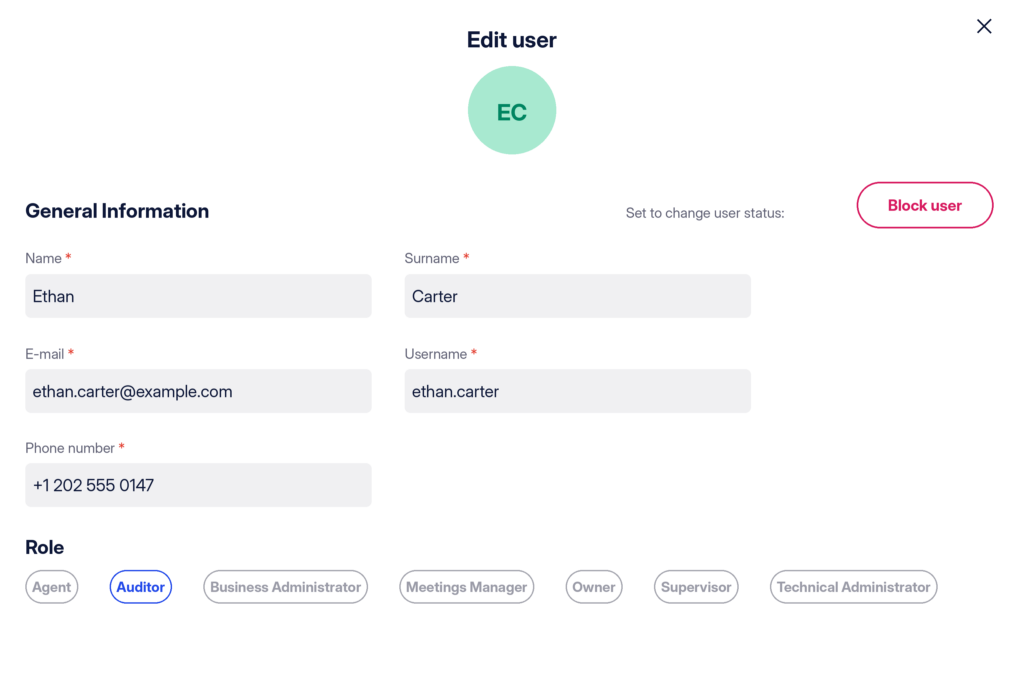
Activating Users Without Deleting Them
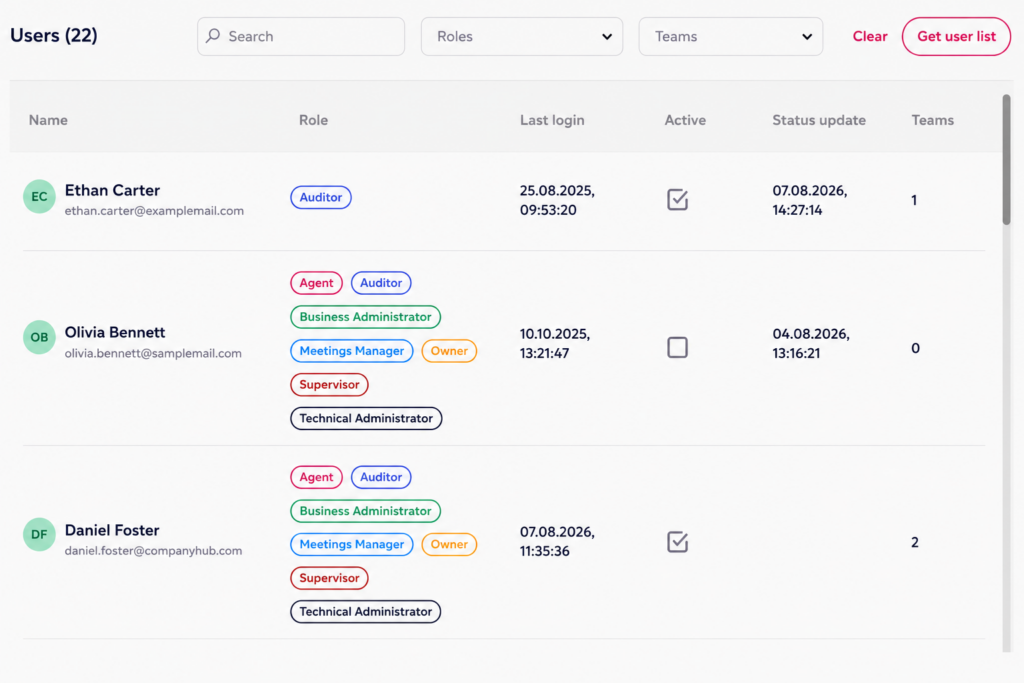
[Screenshot showing a user being deactivated]Managing user accounts is now more flexible. Administrators can activate or deactivate users directly from the users list, eliminating the need to permanently remove accounts when an employee is temporarily unavailable or changes responsibilities.
[Screenshot showing the list of users]
The newest improvement allows organizations to preserve user configuration and history while quickly controlling access to the platform.
[Screenshot showing the “Active” button for changing user status]
Deactivating Case Topics
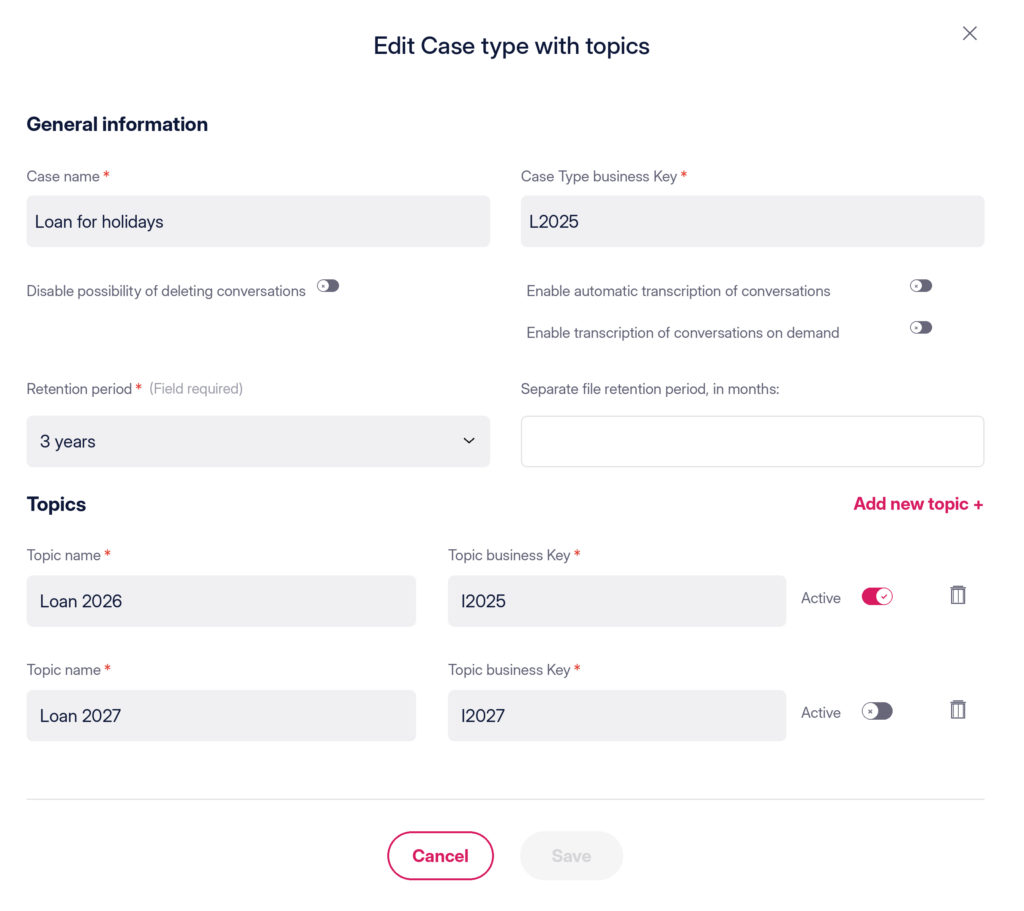
We’ve also added the ability to deactivate case topics within the cases configuration.
Instead of deleting topics that are no longer needed, administrators can simply mark them as inactive. Deactivated topics are automatically hidden from agents, helping keep case selection lists clean and up to date while preserving existing configuration and historical data.
Benefit for the Client
These enhancements provide administrators with greater flexibility in managing users and business configuration. Rather than removing data, organizations can easily turn off elements that are no longer in use, temporarily or permanently, reducing administrative effort while maintaining system integrity and historical consistency.
New Background Management – Centralized, Consistent, and Brand-Ready
Customer ExperienceCustomer Service
July 2026
We’ve redesigned the way virtual backgrounds are managed in the new version of LiveBank, giving organizations greater control over the visual experience of audio and video interactions. Instead of allowing individual background management, virtual backgrounds are now centrally administered by system administrators. This ensures a consistent and professional appearance across the entire organization while still giving advisors the freedom to personalize their workspace. Centralized Background Library Administrators can now upload and manage up to 20 approved virtual backgrounds, creating a [...]
We’ve redesigned the way virtual backgrounds are managed in the new version of LiveBank, giving organizations greater control over the visual experience of audio and video interactions.
Instead of allowing individual background management, virtual backgrounds are now centrally administered by system administrators. This ensures a consistent and professional appearance across the entire organization while still giving advisors the freedom to personalize their workspace.
Centralized Background Library
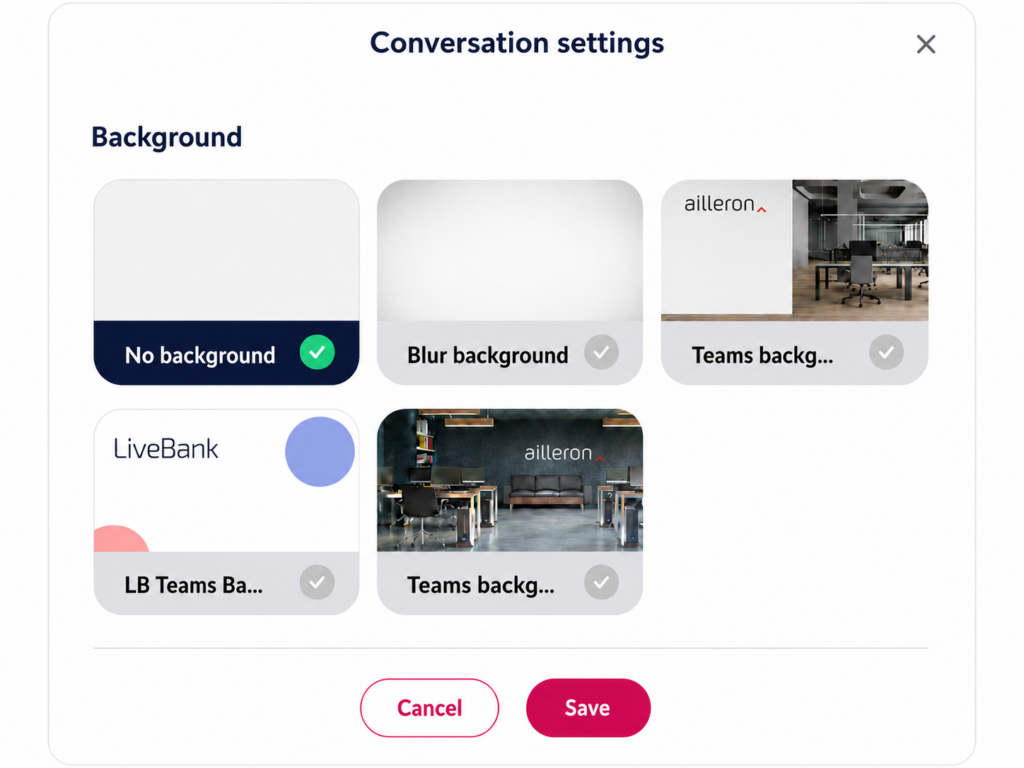
Administrators can now upload and manage up to 20 approved virtual backgrounds, creating a curated library available to all advisors. Now finance companies can easily prepare branded backgrounds for different business units, campaigns, or customer segments while ensuring that only organization-approved images are available for selection.
Personalized Experience for Advisors
Advisors can choose their preferred background from the centrally managed collection using a dedicated settings section within the LiveBank application. Once selected, the background is automatically remembered and remains active until the advisor decides to change it.
Default Background Support
Administrators can also designate a default virtual background for the organization. This background is automatically assigned to new users and remains active until they select another option from the available library, ensuring every advisor starts with a professional, company-approved appearance from day one.
Benefit for the Client
The new centralized background management combines governance with flexibility. Organizations maintain full control over visual branding and compliance, while advisors can still choose the background that best fits their role or working environment. The result is a more consistent customer experience, simplified administration, and a polished, professional look across every video interaction.
New Interaction Model: Parallel Conversations – Personalized Relationships, Private Context
ChatCustomer ServiceRelationship Management
July 2026
We’re introducing an entirely new way to manage customer conversations in LiveBank. With Parallel Conversations, organizations can now decide how customer interactions are structured, creating dedicated communication channels for different advisors, teams, or business areas. Unlike the traditional conversation model, Parallel Conversations allow multiple independent relationships to coexist between the same customer and the organization. Each conversation has its own history, visible only to the advisors assigned to that specific relationship. Two Interaction Models, One Platform LiveBank now supports two [...]
We’re introducing an entirely new way to manage customer conversations in LiveBank. With Parallel Conversations, organizations can now decide how customer interactions are structured, creating dedicated communication channels for different advisors, teams, or business areas.
Unlike the traditional conversation model, Parallel Conversations allow multiple independent relationships to coexist between the same customer and the organization. Each conversation has its own history, visible only to the advisors assigned to that specific relationship.
Two Interaction Models, One Platform
LiveBank now supports two conversation models:
Shared Conversation History – the traditional approach, where every authorized advisor handling the customer has access to the complete conversation history, regardless of who participated in previous interactions.
Parallel Conversations – a new model where each customer-advisor or customer-team relationship maintains its own dedicated conversation history, isolated from all other interactions.
It gives organizations complete flexibility to choose the interaction model that best matches their customer engagement strategy.
A New Level of Relationship Management
Parallel Conversations unlock entirely new business scenarios. For example, a premium banking customer may have:
a dedicated conversation with their personal investment advisor,
a separate conversation with an insurance specialist,
and another conversation with the contact center for day-to-day service requests such as payment cards or account operations.
Each relationship remains completely independent, ensuring that advisors only see the conversation history relevant to their role and area of responsibility.
Privacy by Design
Conversation history is strictly isolated within each relationship. Advisors working in one communication channel cannot access conversations from another unless they are explicitly part of that relationship. It creates a clear separation of business contexts while improving confidentiality and reducing information overload.
Benefit for the Client
Parallel Conversations transform LiveBank from a single communication channel into a relationship-driven engagement platform. Finance companies can now design personalized customer journeys, separate advisory contexts, and provide dedicated service experiences, all while maintaining complete control over conversation visibility and history.
Dedicated Chatbot Team
AI ToolsChatCustomer Service
June 2026
To provide greater visibility and governance over AI-powered interactions, we’ve introduced a dedicated Chatbot Team within the LiveBank team management structure. Available under Settings → Personnel → Teams, this system-managed team automatically assigns the chatbot as an Agent within the back-office environment. As a result, Supervisors and Auditors can monitor chatbot activity using the same familiar tools and workflows they already use to oversee teams of human agents. How Does it Work? The Chatbot Team is a special system team [...]
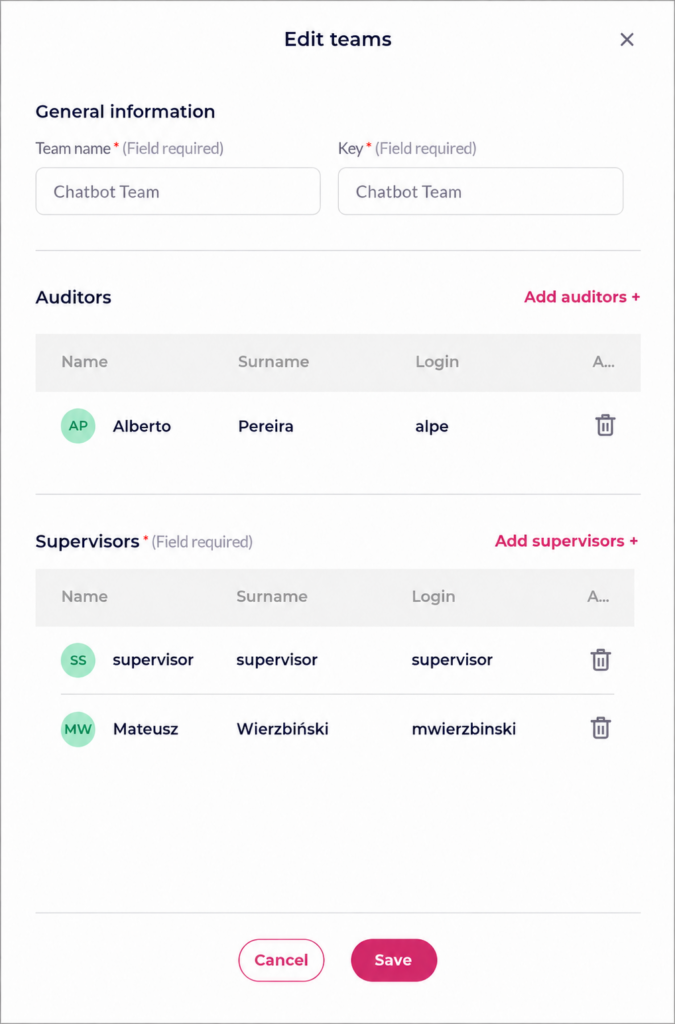
To provide greater visibility and governance over AI-powered interactions, we’ve introduced a dedicated Chatbot Team within the LiveBank team management structure.
Available under Settings → Personnel → Teams, this system-managed team automatically assigns the chatbot as an Agent within the back-office environment. As a result, Supervisors and Auditors can monitor chatbot activity using the same familiar tools and workflows they already use to oversee teams of human agents.
How Does it Work?
The Chatbot Team is a special system team with predefined characteristics:
Team Name: Chatbot Team
Team Key: Chatbot Team
The name and key are system-defined and cannot be modified
The team cannot be deleted
The chatbot is automatically assigned as an Agent within the team
Unified Supervision and Monitoring
The Chatbot Team appears alongside all other teams in the standard team management view, allowing Supervisors and Auditors to access chatbot-related activities through a familiar interface. Team information is presented in the same format as other teams, including the number of assigned members, supervisors, and auditors.
Benefit for the Client
As AI becomes an increasingly important part of customer engagement, organizations need the same level of visibility and governance they already have for human-operated interactions. The Chatbot Team provides a centralized and transparent way to supervise chatbot activity, simplifying audits, operational oversight, and day-to-day management of AI-driven customer conversations.
...
LiveBank uses cookies
This website uses cookies and similar technologies for the purposes of analysis, improving functionality and marketing. Some of the technologies we use are used to ensure the proper functioning of the site, as well as improve its usability - you can object to the use of such technologies using your browser settings, which may, however, negatively affect how the site will work. Some of the technologies (provided by Google, Facebook and LinkedIn) forward the data collected about you to third parties, including for the purpose of analyzing and improving the functioning of the website or for marketing purposes - by clicking "I agree" you agree to the use of these technologies. Rules for applying the above solutions can be found in our Privacy Policy and Google Data Processing Information.
Cookies used to adapt the way this website is displayed to devices, software and user preferences as well as to the settings they choose.
Cookies used to analyze how the website is used and to improve its functioning and security.You can object to the use of cookies from groups 1 and 2 by using your browser settings, which, however, can negatively affect how the website will work.
Cookies for analyzing your data, recognizing if you are a human or personalizing the content displayed to website users through other websites (Google, Facebook and LinkedIn).