


We’ve added a global configuration parameter that gives organizations full control over file sharing in client conversations.
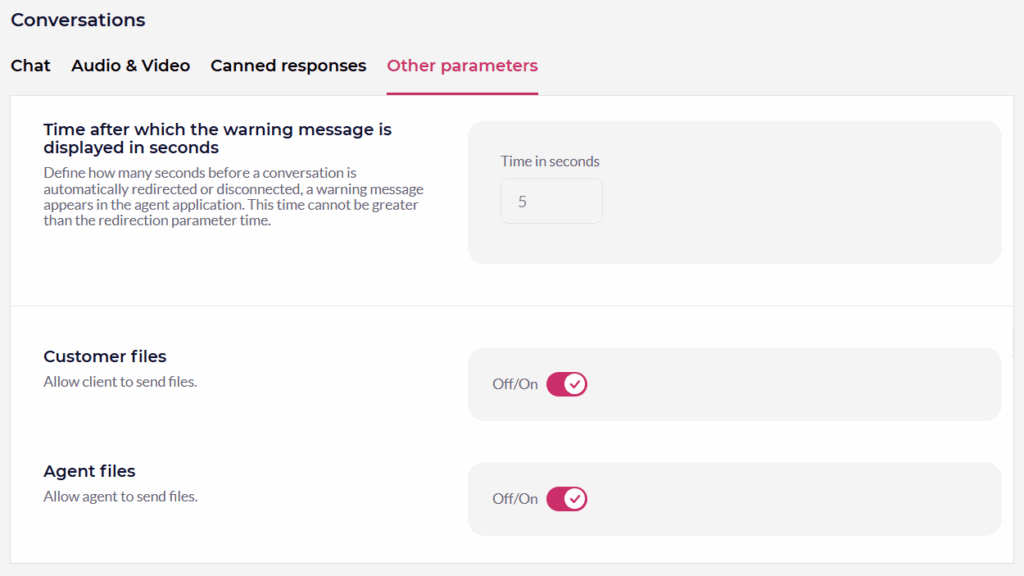
Two global parameters are now available under Features → Conversations → Other Parameters, and are called “Customer files”& “Agent files.”
Available Parameters
- Allow client to send files – controls whether clients can attach files during conversations.
- Allow agent to send files – controls whether specialists can share files with clients.
Both parameters are On/Off switches, with the default value set to ON, and can be managed from the same configuration section.
How Does it Work?
- ON: The file attachment option is visible and fully functional in the conversation interface.
- OFF: The “Add file” button is hidden, preventing files from being shared in that direction.
Benefit for the Client
Organizations can now manage file exchange policies with greater precision – deciding not only whether clients can send files, but also whether specialists can share them. It provides better alignment with compliance requirements, security policies, or specific interaction scenarios – enabling file sharing only where it makes sense from a business, regulatory, or operational perspective.
