


The real-time report is a dashboard with reporting widgets that allow supervisors to monitor queues, agent performance, and KPIs, such as:
- Level of service,
- Average processing time,
- Average response time,
- First-call resolution,
- Customer satisfaction.
The layout of the widgets on the dashboard can be customized to suit the user’s needs. You can set KPI targets, which makes it easier to track progress toward those targets. It is also possible to configure dashboards for agents so they can view their current statistics and performance, both individually and in comparison with the rest of the team.

Table of Contents
Level of Service
Service level is a metric that provides information on the percentage of tasks completed within a specified timeframe. The metric is expressed as a percentage.
Calculation:
The ratio of the number of tasks answered within 20 seconds to the total number of tasks answered.
Default values:
- The estimated response time is 20 seconds.
- The projected threshold is 80%
Key to the colors used:
- If the value is less than 50%, the color is red.
- If the value is greater than or equal to 50% and less than 70%, the color is orange.
- If the value is greater than or equal to 70% and less than or equal to 100%, the color is green.
Example: A service level of 84% means that 84% of all requests handled were resolved within the first 20 seconds.

ASA
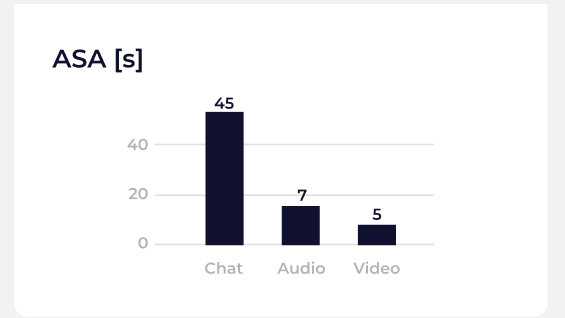
“Average response time” is a metric that provides information on how quickly agents respond to tasks, broken down by available channels. The metric provides information on the average across all tasks. It is expressed in seconds. The time is calculated as follows:
- For the CHAT channel: the time elapsed between the first message from customers and the first message from agents.
- For the audiovisual channel: from the moment the customer initiates the conversation until the agent takes over.
Calculation:
The ratio of the sum of the response times for all answered calls to the number of calls received.
Example: An ASA of 10 seconds means that, for all completed tasks, the average response time is 10 seconds (for example, if there are three completed tasks: two were completed in 5 seconds and one in 20 seconds).
FCR
First-contact resolution is a metric that indicates the percentage of cases resolved during the first interaction with the customer. The metric is expressed as a percentage.
Calculation:
The ratio of the number of cases closed in the first task to the total number of tasks closed.
Default values:
- The projected threshold is 70%
Color key:
- If the value is less than 50%, the color is red.
- If the value is greater than or equal to 50% and less than 70%, the color is orange.
- If the value is greater than or equal to 70% and less than or equal to 100%, the color is green.
Example: An FCR of 75% means that 75% of all cases were resolved during the first interaction.

Examples of situations:
- If an agent receives a new task in a new case and closes both the task and the case (marking the case as “resolved”), and this was the first task in that case, it will count as a “one” in the first-contact resolution (FCR) metric.
- If an agent receives a new task in a new case and closes that case (marks the first case as “resolved”), and that was the first task in that case, and then, for example, opens a new case based on that task and closes it (marking the second case as “resolved”), it will count as a “one” in the First-Time Resolution (FCR) metric.
- If an agent receives new tasks related to a previously opened case (which was opened by another agent) and closes both the task and the case (marking the case as “resolved”), this will count as a “success” in the FCR metric.
- If an agent receives a new task in a new case and then closes only that task (the case remains open), this will not be counted as a success in the FCR metric.
- If an agent receives new tasks related to a previously opened case (the case was opened by another agent) and only closes the task (the case remains open), this will not count as a success in the FCR metric.